The Phishing Gallery – June 2013

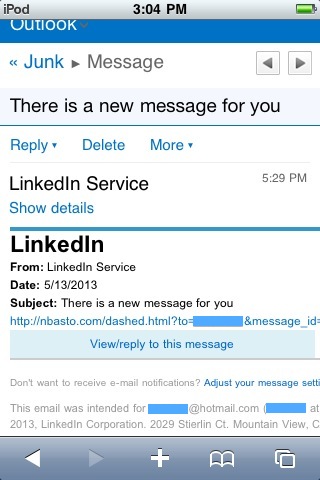
Fake LinkedIn Services Message (Mobile Version)

When viewed on a mobile device, this email appears to come from ‘LinkedIn Service’

By Scott Aurnou

‘Phishing’ attacks are designed to steal your personal, financial and/or log in information. This can be done in a few ways, including via email or text message (referred to as ‘smishing’). They often contain links to websites that look legitimate but are really there to steal your account log in information or host malware ready to attack your computer. These emails and messages can also be used to lure you into contact with scam artists posing as potential clients or officials offering to release substantial funds to you if only you would be so kind as to give them detailed personal information and/or a sum up front. Phishing attacks are generally designed to make you take action by either frightening or tempting you. Some of them are actually very well crafted. Some not so much. And some border on the ridiculous. Each month at The Security Advocate, we will present a few examples, along with explanations of what to look out for to avoid falling victim to one of the scams.
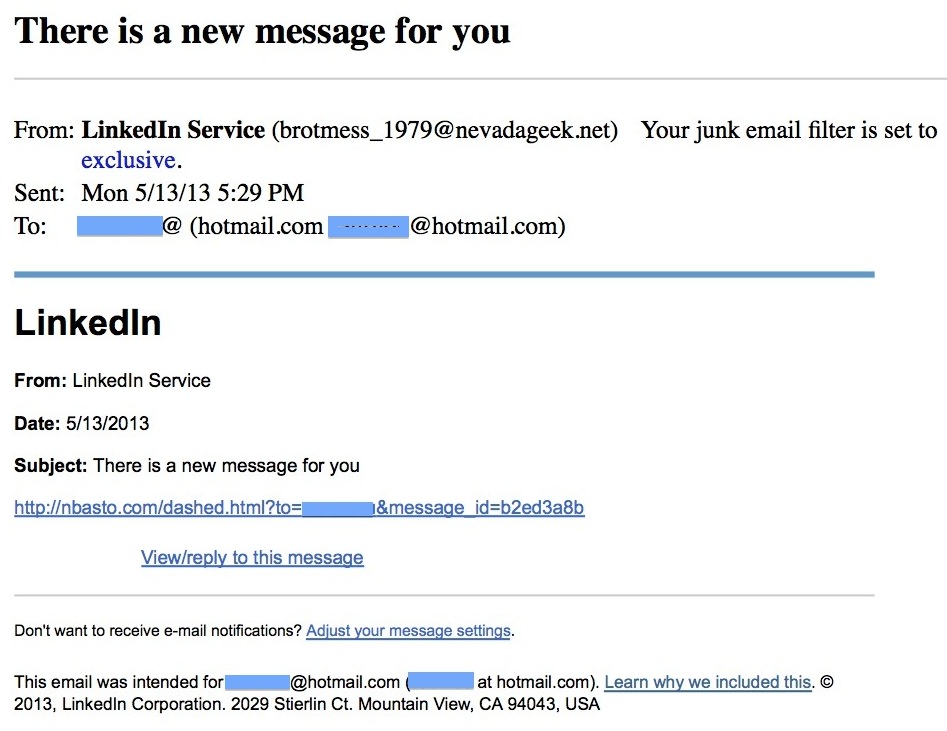
Fake LinkedIn Services Message (Computer Version)

When viewed on a desktop or laptop computer, the actual sender is revealed as ‘brotmess_1979@nevadageek.net’ – obviously not affiliated with LinkedIn


At first glance, this looks like a notice regarding a message received via LinkedIn. Of course, it isn’t and clicking on the link in the message will expose your computer (and possibly network) to attack. While the email above may appear to be relatively accurate at a glance, messages sent through LinkedIn always indicate who they come from. Moreover, as the captions to the images above indicate, this message was not sent by LinkedIn and was likely sent from a botnet. That said, if happen to be checking it on your smartphone – or are just going through your email in a hurry – how do you ensure that you won’t fall into this particular trap? It’s actually fairly easy. Whenever you receive an email notification of an incoming message, etc. from any sort of social media site, be sure to log in to the site directly to read it. Never use the web links found in the notification emails, and you won’t have to find out the hard way that they’re not what they appear to be.
Read more ›
Tagged with: , , , , , ,
Posted in Fraud & Scams, Laptops & Desktops

Is it Really That Dangerous to Use Older Software?


Computer Security Tip of the Week

Scott Aurnou – Staying with familiar older software may seem easier than moving to something new, but protecting your computer and network can become problematic once the software developer stops issuing security updates to protect it from hackers.

If you enjoyed this video, you can see more on TheSecurityAdvocate YouTube channel (and subscribe if you like).

Tagged with: , , , , , ,
Posted in Laptops & Desktops, Network Security, Security Tip of the Week

Receive an Email with an ‘Important’ Google Docs Link? Read This First…

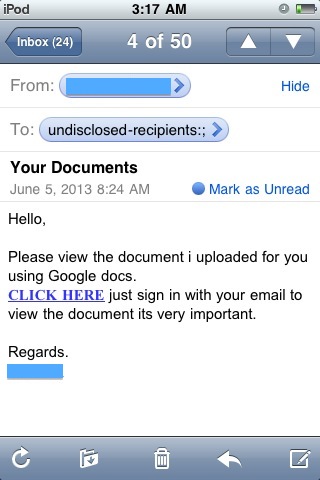
Fake Google Docs MessageBy Scott Aurnou

Has someone in your contacts list sent you an email like this one with an innocuous-sounding subject line like Review the Documents or Your Documents and a link to an ‘important’ or ‘confidential’ document in Google Docs? If so, hopefully it struck you as a little fishy (because it is). This sort of email is a sign that hackers have likely gotten your contact’s log-in details and are trying to do the same to you by tricking you into clicking on the link.

If you do click on it, you will be taken to a fake Google sign-in webpage that only exists to get you to enter your account name and password. And if you do that, the scam artists behind it will then use your account to send identical emails to all of the people in your email contact list. Even if no one clicks on the links in the emails sent from your account, once the hackers have your log-in information, they can use it to hijack your various Google accounts (Gmail, Google+, Google Drive, YouTube, etc.), access any information you’ve stored there and even pose as you to pull scams on your friends and family (e.g., “I’m stranded in X foreign country. Can you please wire me $_____ so I can get home?”). Yes, some people do fall for those and it can be an expensive mistake.
Read more ›

Tagged with: , , , , ,
Posted in Fraud & Scams, Laptops & Desktops, Smartphones & Tablets

How Can Computer Forensics Safeguard Your Company Before There’s a Problem?


Computer Security Tip of the Week

If you believe that there may be a chance that the potential electronic evidence contained on a departing employee’s computer or mobile devices could be needed later, computer forensics can be used to preserve it at a fraction of the cost of trying to retrieve it later (when you really need it and it’s much more difficult and expensive to get). Learn more about it here.

If you enjoyed this video, you can see more on TheSecurityAdvocate YouTube channel (and subscribe if you like).

Tagged with: , , , , , , , , ,
Posted in Laptops & Desktops, Security Tip of the Week

5 Computer Security Terms You Ought to Know

By Scott Aurnou

The world of computer security has plenty of confusing terms, though many of them are also very helpful to know so you can protect your data (and yourself). Here are a few:

Drive-By Download: A drive-by download is a piece of malicious software (aka ‘malware’) that is downloaded onto your computer or mobile device without your knowledge when you visit an infected website. Although they are frequently found on malicious websites, drive-by downloads can also be lurking on normal ones that have been compromised by hackers. The best things you can do to defend yourself are to keep your software up-to-date (since malware often attacks through older security flaws that a given software manufacturer has already fixed via an update) and think before you click. If you’re using a desktop or laptop computer, you can hover over a given link before clicking on it. The destination address will appear on the lower left of your screen. If it’s something you don’t expect or haven’t seen before, don’t click on the link.

Jailbreaking: ‘Jailbreaking’ or ‘rooting’ a mobile device refers to overriding the manufacturer’s settings – including disabling the device’s security settings and future updates – to allow it to download and use apps and other features that are normally not enabled on the device (‘jailbreaking’ refers to the process as it applies to an Apple iPhone, iPod Touch or iPad and ‘rooting’ is much the same for a smartphone or tablet running the Android mobile operating system). The vast majority of mobile malware affects these devices since their security systems are badly compromised by the jailbreaking or rooting process and they should never be connected to a business computer network.
Read more ›

Tagged with: , , , , , , , , ,
Posted in Fraud & Scams, Laptops & Desktops, Network Security, Smartphones & Tablets
Twitter: saurnou
TheSecurityAdvocate Youtube Channel