
Android ‘Master Key’ Discovered – Huge Potential Problem?

Smartphone with Lifesaver Buoy.comBy Scott Aurnou

This past week, mobile security start up firm BlueBox Security announced that it had found a serious vulnerability in Google’s Android mobile operating system (the software underlying most of the world’s smartphones and tablets), which it dubbed a ‘master key’ (a fairly accurate description). Using this flaw, an attacker can completely take over an Android mobile device, unbeknownst to its owner. This includes listening in on any conversations either on or near the device, stealing any data stored on it and co-opting the device into a mobile botnet to send spam messages to others. Moreover, the flaw can be found in every version of the OS stretching back to 2009’s version 1.6 (known as ‘Donut’) and affects 99% of all Android devices. Yes, this is a serious problem and the story was soon picked up in mainstream news sources like the BBC and NBC News.

BlueBox had intended the announcement as a ‘teaser,’ with details on the flaw to be offered at a security conference on August 1st, but hackers figured it out within five days. As a result, this is not a theoretical threat.
Read more ›

Tagged with: , , , , , ,
Posted in Smartphones & Tablets

The Phishing Gallery – July 2013

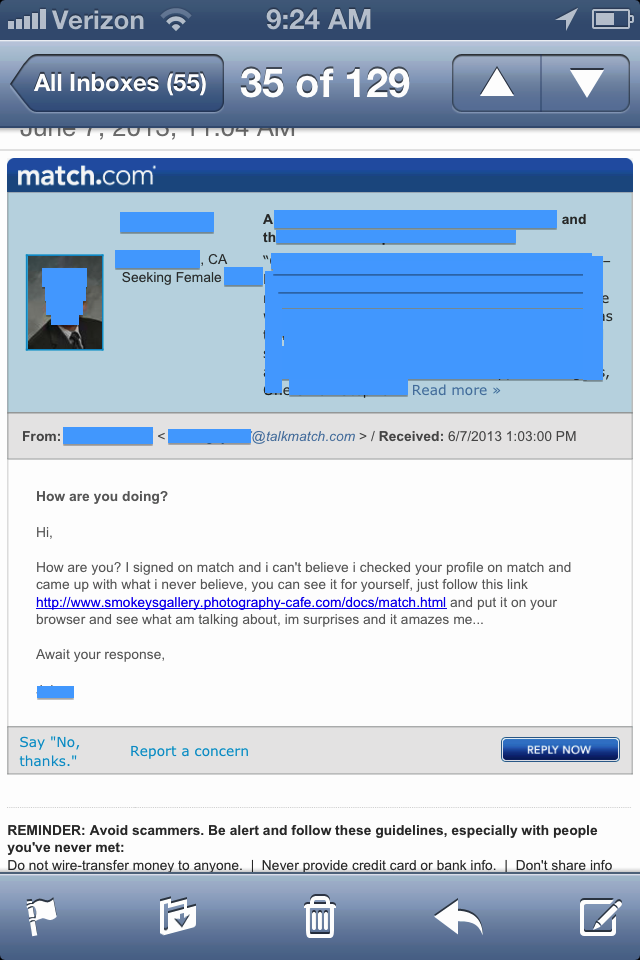
Fake Match EmailBy Scott Aurnou

‘Phishing’ attacks are designed to steal your personal, financial and/or log in information. This can be done in a few ways, including via email or text message (referred to as ‘smishing’). They often contain links to websites that look legitimate but are really there to steal your account log in information or host malware ready to attack your computer as soon as you click on the link. These emails and messages can also be used to lure you into contact with scam artists posing as potential clients or officials offering to release substantial funds to you if only you would be so kind as to give them detailed personal information and/or a sum up front. Phishing attacks are generally designed to make you take action by either frightening or tempting you. Some of them are actually very well crafted. Some not so much. And some border on the ridiculous. Each month at The Security Advocate, we will present a few examples, along with explanations of what to look out for to avoid falling victim to one of the scams.

The image above depicts a message received from an account on Match.com. The message reads:

Hi,
How are you? I signed on match and i can’t believe i checked your profile on match and came up with what i never believe, you can see it for yourself, just follow this link [scam link redacted] and put it on your browser and see what am talking about, im surprises and it amazes me…
Await your response

Read more ›

Tagged with: , , , , , ,
Posted in Fraud & Scams, Laptops & Desktops

Do Macs Get Viruses & Other Malware?


Computer Security Tip of the Week

Scott Aurnou – Thanks to some clever marketing campaigns, you may have the impression that Apple computers are either immune to or far less likely to be vulnerable to malware, so you really don’t have to worry about electronic attacks. Well, you know what they say about things that sound too good to be true…

Websites referenced in this video include:
Sophos Anti-Virus for Mac: http://www.sophos.com/en-us/products/free-tools/sophos-antivirus-for-mac-home-edition.aspx
Intego Virus Barrier: http://www.intego.com/virusbarrier

If you enjoyed this video, you can see more on TheSecurityAdvocate YouTube channel (and subscribe if you like).

Tagged with: , , , , , , , , , , , , ,
Posted in Laptops & Desktops, Security Tip of the Week

How Do You Permanently Delete the Data on a Computer?

Shredded PaperBy Scott Aurnou

When the time comes to throw away, give away, sell or otherwise dispose of a computer, you should be sure to permanently erase the data on it. Otherwise, the new owner – or someone who has fished it out of the trash (yes, this actually happens) – will be able to read the financial, business and personal data, as well any other information, that was on the hard drive when you stopped using it. Often this will also include data that you may have thought was deleted but is actually still on the hard drive. Pressing ‘delete’ doesn’t actually erase a file or program permanently and even a moderately skilled hacker will be able to retrieve it. Naturally, this begs the question: how do you permanently delete the data that you don’t want lingering on the computer once you are ready to dispose of it?

A typical computer hard drive stores electronic information magnetically. Magnetically stored data can be genuinely deleted via overwriting, demagnetization or physical destruction.

Overwriting refers to storing new data in same storage space as – and effectively on top of – the older data being deleted. A helpful analogy could be thinking of the older data like a footprint in a muddy field. If someone steps on it, the new footprint will effectively ‘overwrite’ the old one. A number of programs exist to deliberately overwrite the data on a hard drive with random 1s and 0s (gibberish, in effect), but it’s a time consuming process – as the data is generally overwritten several times – and it might not make the data completely inaccessible. A hacker skilled in computer forensics may still be able to recover some of the data (assuming it’s worth the time and expense to do so). An overwritten drive can be reused.
Read more ›

Tagged with: , , , , , , , , , , ,
Posted in Laptops & Desktops, Privacy Issues
Twitter: saurnou
TheSecurityAdvocate Youtube Channel