HIPAA and the Cloud: Securing Patient Data

Health CloudBy Gilad Parann-Nissany

The Health Insurance Portability and Accountability Act (HIPAA) has been around for many years with the main purpose of governing the use and disclosure of individuals’ health information. The recent dramatic trend of healthcare-driven companies to migrate to cloud computing requires a cloud-specific security approach for HIPAA and the cloud. In this article, I will touch on some of the major HIPAA requirements as they relate to the cloud, and will highlight points to consider when securing patient data in the cloud.

HIPAA cloud requirement #1: Access control
According to HIPAA, a covered entity must implement technical policies and procedures that allow only authorized persons to access electronic protected health information – this is highly relevant for HIPAA and the cloud. Once operating within the cloud, healthcare data can be potentially accessed from within the cloud by a snooping employee (one of many examples of possible breaches). To adhere to this requirement in cloud environments, address the following points:

A. Automate:
Make sure your cloud key management system [which manages the cryptographic keys in an encryption system] can be automated so that administrators cannot access or see key values used for encrypting healthcare data.
Read more ›

Tagged with: , , , , , , , , , , ,
Posted in Cloud Security, Guest Posts

The Help Desk: An Unexpected Security Risk


Computer Security Tip of the Week

Scott Aurnou – Help desk personnel are there to iron out a variety of problems and keep business operations running smoothly. As the name implies, they are there to help – a trait that hackers are more than happy to use against them to gain access and steal or sabotage your company’s sensitive data.

If you enjoyed this video, you can see more on TheSecurityAdvocate YouTube channel (and subscribe if you like).

Tagged with: , , , , ,
Posted in Fraud & Scams, Network Security, Security Tip of the Week

The NSA Can Decrypt Much of the Internet – What Can You Do?

G ManBy Scott Aurnou

Over the past few months, a steady stream of information regarding NSA surveillance practices obtained from former agency contractor Edward Snowden has been released through the media. While these leaks have revealed a surprisingly pervasive monitoring apparatus covering everything from apparent deals for access to data held by well-known technical companies to mass harvesting of telephone call records, the real shock came on September 5th: in effect the agency has compromised much of the fundamental encryption underlying the Internet itself, as well as a number of commercial software products thought to be secure.

This article will cover what happened, how it happened, what the effects are and what steps you can take to try and keep your private information secure from prying eyes.

The basics. The New York Times, The Guardian and ProPublica co-authored a report revealing that the National Security Agency can decrypt most of the electronic traffic on the Internet, likely including data protected via the Secure Sockets Layer (the encrypted protocol that oversees the connection between your browser and the websites it displays) and many supposedly secure virtual private networks (aka VPNs).
Read more ›

Tagged with: , , , , , , , , , , , , , , , , , , , , , , ,
Posted in Cloud Security, Laptops & Desktops, Network Security, Privacy Issues, Smartphones & Tablets

The Phishing Gallery – September 2013

By Scott Aurnou

‘Phishing’ attacks are designed to steal your personal, financial and/or log in information. This can be done in a few ways, including via email or text message (referred to as ‘smishing’). They often contain links to websites that look legitimate but are really there to steal your account log in information or host malware ready to attack your computer as soon as you click on the link. These emails and messages can also be used to lure you into contact with scam artists posing as potential clients or officials offering to release substantial funds to you if only you would be so kind as to give them detailed personal information and/or a sum up front. Phishing attacks are generally designed to make you take action by either frightening or tempting you. Some of them are actually very well crafted. Some not so much. And some border on the ridiculous. Each month at The Security Advocate, we will present a few examples, along with explanations of what to look out for to avoid falling victim to one of the scams.

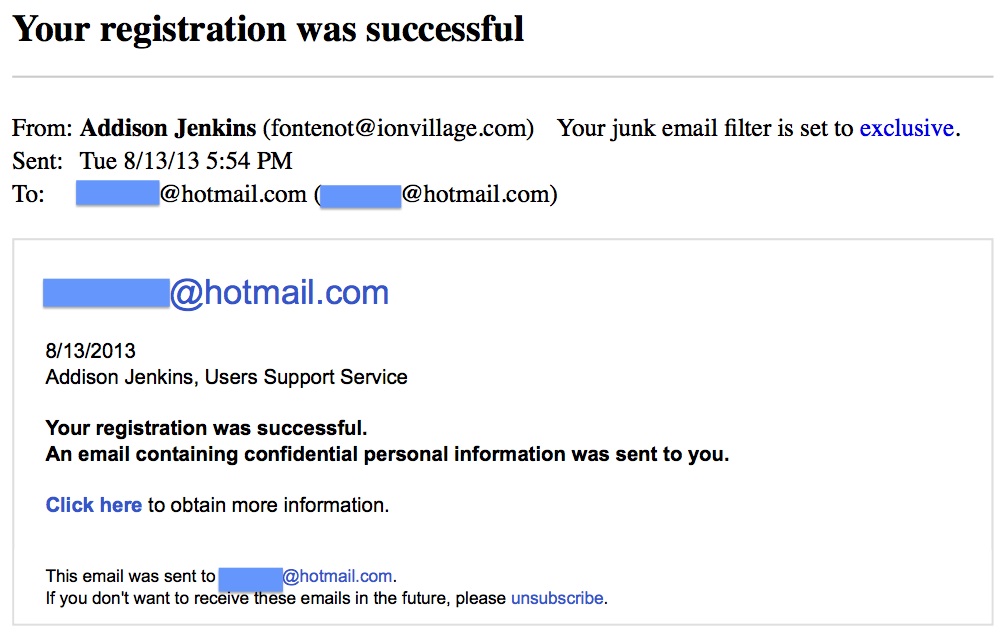
Fake 'Registration' MessageFirst up, we have a confirmation message for something you don’t recall signing up for. The subject line is “Your registration was successful” and it reads as follows:

Addison Jenkins, Users Support Service
Your registration was successful.
An email containing confidential personal information was sent to you.
Click here to obtain more information.

The idea here is simple: you receive the email, wonder what service sent it (as that information is conspicuously absent), click on the link, and your computer will be immediately attacked by malware and/or you will be take to a website with a form you can fill out (with account and/or detailed personal information) to ‘opt out’ of the service you never signed up for. This will give the scammers who actually sent the message enough data to break into your online accounts and possibly impersonate you, as well. Any message like this is a fake. Simply put: you should never click on any links contained in an email (or text message) coming from someone you don’t know.
Read more ›

Tagged with: , , , , , , , , , , , , ,
Posted in Fraud & Scams, Laptops & Desktops
Twitter: saurnou
TheSecurityAdvocate Youtube Channel