Mobile Banking Safety: a Few Tips


Computer Security Tip of the Week

Scott Aurnou – Increasingly popular mobile banking apps allow you to connect with your bank at your convenience. Hackers know this and are more than happy to use them to steal your personal information, financial account log-in details and your money. Learn how to protect yourself here…

Websites referenced in this video include:
Lookout Mobile Security
Sophos Mobile Security for Android
Top Ten Reviews – Best Mobile Security Software

If you enjoyed this video, you can see more on TheSecurityAdvocate YouTube channel (and subscribe if you like).

Tagged with: , , , , , , , , , , , , , , , , , , , ,
Posted in Security Tip of the Week, Smartphones & Tablets

What Are Honeypots (and How Can They Protect Your Network)?


Computer Security Tip of the Week

Scott Aurnou – Securing a computer network from hackers with advanced skills can be tricky business. One surprisingly effective (and affordable) way to protect it is by deploying honeypots. Learn more about them here…

Websites referenced in this video include:
Glastopf
Ghost USB
KFSensor
Specter

If you enjoyed this video, you can see more on TheSecurityAdvocate YouTube channel (and subscribe if you like).

Tagged with: , , , , , , , , , , ,
Posted in Network Security, Security Tip of the Week

The Phishing Gallery – October 2013

By Scott Aurnou

‘Phishing’ attacks are designed to steal your personal, financial and/or log in information. This can be done in a few ways, including via email or text message (referred to as ‘smishing’). They often contain links to websites that look legitimate but are really there to steal your account log in information or host malware ready to attack your computer as soon as you click on the link. These emails and messages can also be used to lure you into contact with scam artists posing as potential clients or officials offering to release substantial funds to you if only you would be so kind as to give them detailed personal information and/or a sum up front. Phishing attacks are generally designed to make you take action by either frightening or tempting you. Some of them are actually very well crafted. Some not so much. And some border on the ridiculous. Each month at The Security Advocate, we will present a few examples, along with explanations of what to look out for to avoid falling victim to one of the scams.
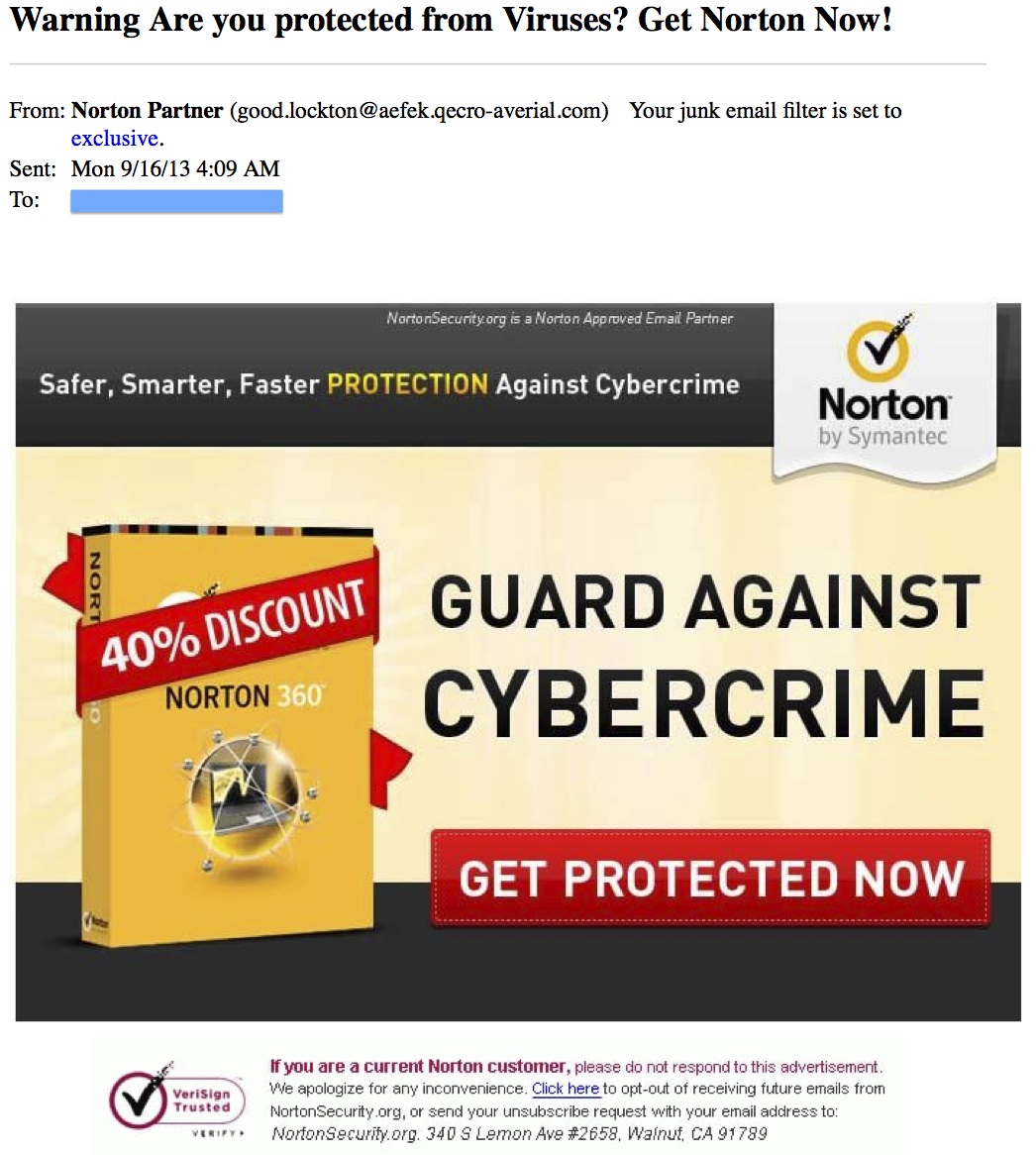
Fake 'Norton Partner' Message
An email like this one, with the subject line ‘Warning Are you protected from Viruses? Get Norton Now!‘ paints an alluring picture, but that’s all it is: a picture. And it has nothing at all to do with the real Norton or the VeriSign logo at the bottom left of the image. It’s no different than if you took a picture of a Pepsi bottle and sent it to someone else yourself while pretending that it was coming from PepsiCo directly. As for the Norton angle… many attacks masquerade as ‘security’ software with the intent of scaring you into buying ‘protection’ from a non-existent threat, allowing the scammer to remotely access your computer to ‘fix’ the ‘problem’ (and potentially steal your data and/or leave you a lovely malware-laden parting gift), or simply take you to a website to trick you into giving up your personal and financial information. Also, don’t get thrown off by vaguely legitimate-sounding sender’s name – like ‘Antivirus Deals’ or ‘Norton Partner’ – especially if it doesn’t match the sender’s email address. This generally indicates an automated message sent via a botnet solely to attack the recipient of the message. The vast majority of spam emails come from computers under the commend of a botnet.
Read more ›

Tagged with: , , , , , , ,
Posted in Fraud & Scams

What Does a “Virus Detected!” Warning On My Computer Mean?


Computer Security Tip of the Week

Have you ever seen a pop-up window warning that your computer has been infected with malware? Is it really infected? And what can you do about it?

Websites referenced in this video include:
Malwarebytes

If you enjoyed this video, you can see more on TheSecurityAdvocate YouTube channel (and subscribe if you like).

Tagged with: , , , , , , , ,
Posted in Laptops & Desktops, Security Tip of the Week

Can Anything Go Wrong If You Don’t Log Out?


Computer Security Tip of the Week

Scott Aurnou – Logging in and out of your various online accounts over and over again can be a little annoying. And, besides, it’s your own stuff, so what’s the big deal? Well, what if you put down or step away from your computer, smartphone or tablet (or it gets lost or stolen) while all of those accounts are open…?

If you enjoyed this video, you can see more on TheSecurityAdvocate YouTube channel.

Tagged with: , , , , , , , , , , ,
Posted in Laptops & Desktops, Security Tip of the Week, Smartphones & Tablets
Twitter: saurnou
TheSecurityAdvocate Youtube Channel