What is Java and Do You Want It On Your Computer?

java-wallpaper-2By Scott Aurnou

News reports regarding ‘zero-day malware’ threats to Java have been hard to miss in recent days. Of course, this may beg a few questions, like what is zero-day malware? And what is Java, exactly?

Zero-day malware refers to malicious software that attacks a flaw in a program or system that hasn’t yet been fixed by the developer or manufacturer. Until a software update that addresses the vulnerability is released, there is often no defense to an attacker exploiting that particular flaw other than to disable or completely remove the software at risk. Java, a popular and widely available program, has been targeted with a number of zero-day threats.
Read more ›

Tagged with: , , , , , , , , , , , , , ,
Posted in Laptops & Desktops, Network Security, Smartphones & Tablets

SEO Poisoning Explained


Computer Security Tip of the Week

Scott Aurnou – Cybercriminals often use ‘SEO poisoning’ – loading up malware-infected websites with keywords and pictures that make them show up high in popular search results – to attack you when you browse the Web. In addition to keeping your software up-to-date, you should always think before you click.

Helpful websites referenced in this video include:
Secunia: http://secunia.com/
AppFresh for Mac: http://metaquark.de/appfresh/mac
Sophos Anti-Virus for Mac: http://www.sophos.com/en-us/products/free-tools/sophos-antivirus-for-mac-home-edition.aspx

If you enjoyed this video, you can see more on TheSecurityAdvocate YouTube channel (and subscribe if you like).

Tagged with: , , , , , , , , ,
Posted in Fraud & Scams, Laptops & Desktops, Security Tip of the Week

The Phishing Gallery – January 2013

By Scott Aurnou

‘Phishing’ attacks are designed to steal your personal, financial and/or log in information. This can be done in a few ways, including via email or text message (referred to as ‘smishing’). They often contain links to websites that look legitimate but are really there to steal your account log in information or host malware ready to attack your computer. These emails and messages can also be used to lure you into contact with scam artists posing as potential clients or officials offering to release substantial funds to you if only you would be so kind as to give them detailed personal information or a sum up front. Some of these attacks are actually very well crafted. Some not so much. And some border on the ridiculous. Each month at The Security Advocate, we will present a number of examples, along with explanations of what to look out for to avoid falling victim to one of the scams.
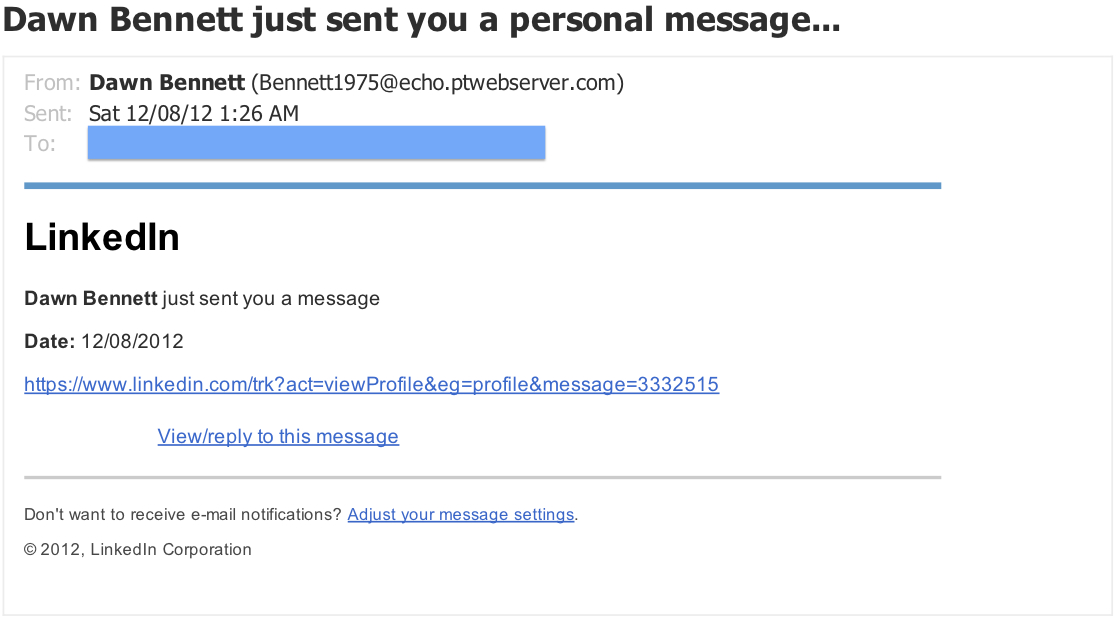
LinkedIn 'Personal Message' Phishing Email - Dec 2012

While this appears to be an innocuous LinkedIn message from someone not in the recipient’s contact list, it isn’t. On LinkedIn itself, there was no corresponding message in the account inbox. Of course, the email above does look quite accurate, but… So how do you avoid this particular trap? It’s actually fairly easy. Anytime you receive an email notification of an incoming message, etc. from any sort of social media site, just log in to the site directly to read it. Never use the web links found in the notification emails, and you won’t have to find out the hard way that they’re not what they appear to be.
Read more ›

Tagged with: , , , , , , , , , , , , , , ,
Posted in Fraud & Scams, Laptops & Desktops, Network Security, Smartphones & Tablets

What is a Phishing Attack? And How Can You Avoid One?


Computer Security Tip of the Week

Scott Aurnou – An attacker will use a ‘phishing’ email to trick you into revealing your personal, financial and/or log in information. It might look like a message from a respected business or even colleague, but its true purpose is to steal your data.

For more information on identifying – and avoiding – phishing attacks, click here.

If you enjoyed this video, you can see more on TheSecurityAdvocate YouTube channel (and subscribe if you like).

Tagged with: , , , , , , , , ,
Posted in Fraud & Scams, Laptops & Desktops, Security Tip of the Week

New Year’s Resolution: Protect Your Computer

New Years Resolution blog post picBy Scott Aurnou

With the New Year come resolutions. If one of yours is to stay safer online, here are some tips:

Browse the Web with a non-administrative account. Computers come with primary user accounts featuring ‘administrative privileges.’ Those privileges allow full access to the computer, including the ability to download, modify and delete programs. While you need that to add, change or remove any software on your computer, you don’t need it to browse the Web. If an attacker is able to gain access to an administrative account, he or she will be able to control your system. To keep this from happening, set up a user account with non-administrative access to browse the Web (and limit the potential damage an attacker can do). Setting up these accounts isn’t difficult, though it varies from operating system to operating system. Here are links to set them up on a Mac, a Windows XP computer, a Windows Vista or Windows 7 PC, and a Windows 8 computer.

Keep your software up-to-date. Nearly all malware attacks target flaws in software that have already been fixed by the manufacturer via software updates. If you have downloaded and installed those updates, the vast majority of attacks against your computer will fail. Some programs can be set to update automatically and it’s always a good idea to take advantage of that. Another great way to ensure that your computer stays up-to-date is to use software that automatically updates other programs. Secunia’s Personal Software Inspector is an excellent choice for Windows-based computers. FileHippo is also very good and AppFresh can be used to keep software up-to-date on a Mac.
Read more ›

Tagged with: , , , , , , , , , , , , , , , , , , , , , , , ,
Posted in Laptops & Desktops, Network Security
Twitter: saurnou
TheSecurityAdvocate Youtube Channel