QR Codes Can Pose a Security Risk. Yes, Really…

By Scott AurnouThe Security Advocate QR Code (with caption)

QR (short for ‘quick response’) codes are often relatively small boxes that look somewhat like scrambled checkerboards and can be scanned to connect to websites, pictures, files and other content hosted online. While many of them have a black and white boxed-shaped design similar to the image accompanying this article, they can also come in different shapes and colors. In addition to purpose-built scanners designed to read the codes – like one you might see at an airport security checkpoint – many mobile devices can read them if you download a scanning app.

In addition to practical applications like the aforementioned airport security checkpoint or tracking manufactured goods in a factory or warehouse setting, QR codes are often used as marketing tools offering up promotional information or discounts (i.e., ‘Scan here to get 10% off your next order,’ etc.). There are a number of uses for them, but they can also present a significant security risk. In effect, the codes are direct links to online content and they can introduce malware onto your mobile device just like an infected link in an Internet search, an email or text message can. Does that mean you shouldn’t use them? No, but – like dealing with anything else on the Web – don’t forget your common sense at the door.
Read more ›

Tagged with: , , , , , , ,
Posted in Fraud & Scams, Smartphones & Tablets

A Web Inject Attack Can Empty Your Online Banking Account Before You Know What Happened


Computer Security Tip of the Week

Scott Aurnou – Web inject attacks are a serious risk when online banking. While they masquerade as security enhancements, they actually steal your log in information and start emptying your bank account almost immediately. Here’s how to recognize them and what to do when you see one.

Helpful websites referenced in this video include:
Secunia: http://secunia.com/
AppFresh for Mac: http://metaquark.de/appfresh/mac

If you enjoyed this video, you can see more on TheSecurityAdvocate YouTube channel (and subscribe if you like).

Tagged with: , , , , , , , , , , , , ,
Posted in Fraud & Scams, Laptops & Desktops, Security Tip of the Week

International Traveler? You May Want to Know About This…

Customs AgentBy Scott Aurnou

In late January 2013, the U.S. Department of Homeland Security’s Office of Civil Rights and Civil Liberties (CRCL) issued an executive summary of a report concluding that it is legal for border agents to seize, inspect and confiscate laptop computers, mobile devices and other electronics at the U.S. border for any reason – or no reason. There is no requirement for any level of suspicion beforehand. This is called the ‘border search exception’ to the Fourth Amendment. Simply put, its protections against unreasonable search and seizure do not apply at the border (which is actually defined as up to 100 miles inland).

This may sound like a shocking overreach, but this policy is not new, only the recent report asserting its legality is. In effect, the CRCL equates searching your laptop, smartphone, etc. with looking through your luggage at an airport.

Of course, other countries have similar approaches. Some will also seek to copy your data for future use or install spyware to read and listen in on what you do. This begs the question:

What steps should you take to protect your company and personal data? If you’re traveling internationally for business, keep in mind where you will be going and what rules apply there.
Read more ›

Tagged with: , , , , , , , , , , , , , , , , , , , , , , , , , , , , ,
Posted in Laptops & Desktops, Privacy Issues, Smartphones & Tablets

A Scam Delivered Through Your Phone? Watch Out for ‘Smishing’ & ‘Vishing’ Attacks


Computer Security Tip of the Week

Scott Aurnou – Like a phishing attack, ‘smishing’ texts and ‘vishing’ robocalls are used to trick you into revealing your personal, financial and/or log in information. Here’s how to recognize them and what to do when you see one.

If you enjoyed this video, you can see more on TheSecurityAdvocate YouTube channel (and subscribe if you like).

Tagged with: , , , , , , , , , , , , , , ,
Posted in Fraud & Scams, Security Tip of the Week, Smartphones & Tablets

The Phishing Gallery – February 2013

By Scott Aurnou

Cyber criminals hackers and scammers use ‘phishing’ attacks to steal personal, financial and/or log in information. This can be done in a few ways, including via email or text message (referred to as ‘smishing’).

Image courtesy of Denise Ellen Pordy

Image courtesy of Denise Ellen Pordy

These attacks frequently contain links to websites that look legitimate but are really there to steal your account log in information or host malware ready to attack your computer. These emails and messages can also be used to lure you into contact with scam artists posing as potential clients or officials offering to release substantial funds to you if only you would be so kind as to give them detailed personal information or a sum up front. Some of these attacks are actually very well crafted. Some not so much. And some border on the ridiculous. Each month at The Security Advocate, we will present a number of examples, along with explanations of what to look out for to avoid falling victim to one of the scams.

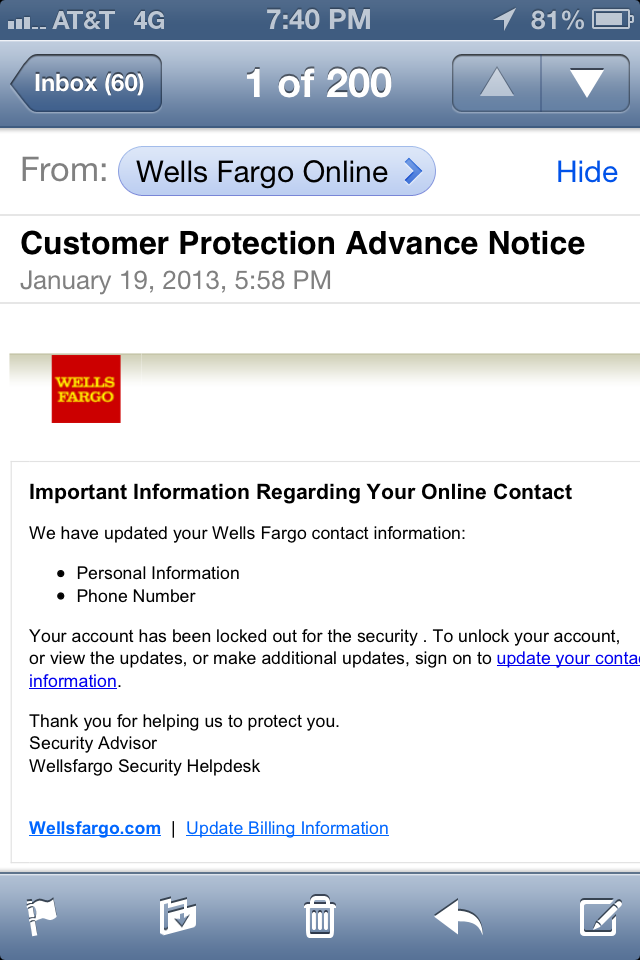
Important Information Regarding Your Online Contact
We have updated your Wells Fargo contact information:
Personal Information
Phone Number
Your account has been locked out for the security . To unlock your account,
or view the updates, or make additional updates, sign on to update your contact information.
Thank you for helping us to protect you.
Security Advisor
Wellsfargo Security Helpdesk

While you should always regard any unsolicited email appearing to come from a bank with suspicion, this one is a fairly well-designed phishing attack. It includes an accurate-looking bank logo and is relatively well-written. It’s still fake, though. The threat of a locked account is a fairly typical one used by scammers and is intended to scare you into immediate action. Invariably, you can ‘reauthorize your account’ if you just give the sender your personal and/or log in information. Never do this. The threat is fake. The message does not come from Wells Fargo, your account is not locked and ‘reauthorizing’ it is simply giving your information to cyber criminals. If you are at all concerned when you receive a message like this, contact the bank directly, using the telephone number on the back of your bank card or one of your bank statements. You can also go directly to the bank’s website to check. Just don’t try to go through anything in the email.
Read more ›

Tagged with: , , , , , , , , , , , ,
Posted in Fraud & Scams, Laptops & Desktops, Network Security, Smartphones & Tablets
Twitter: saurnou
TheSecurityAdvocate Youtube Channel